Add account in Citrix Workspace app
If your administrator asks you to add an account, follow these steps:
Add account on desktop devices
Add account on mobile devices
Add account on desktop devices
This section describes how to add an account in Citrix Workspace app on your desktop devices, which runs on Windows, Mac, Linux, ChromeOS, and HTML5 (web browser) operating systems.
Add new user account
- Open the Citrix Workspace app.
-
In the new window, enter your store URL or email address.
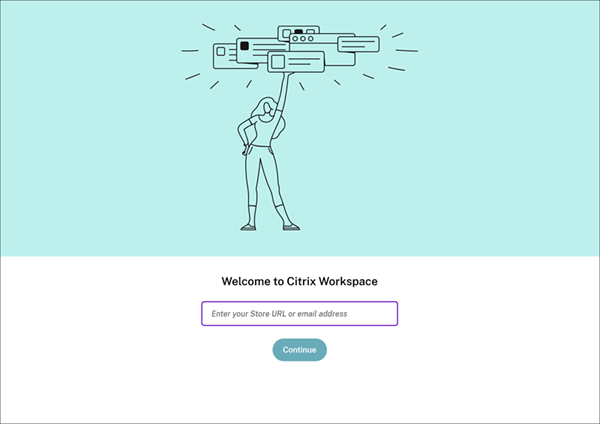
- Click Continue or Connect, depending on which option appears on your screen.
- Enter you credentials, if prompted.
Add multiple accounts
- Open the Citrix Workspace app.
-
Click the account icon in the upper‑right corner and then click Accounts.
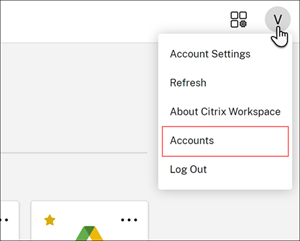
- To add another account, click Add, +, or the gear icon, depending on which option appears on your screen.
Note:
You can’t add more than one account in the HTML5 platform (web browser).
For more information on managing account, refer:
Add account on mobile devices
This section describes how to add an account in Citrix Workspace app on your mobile devices, which runs on Android and iOS operating systems.
Add new user account
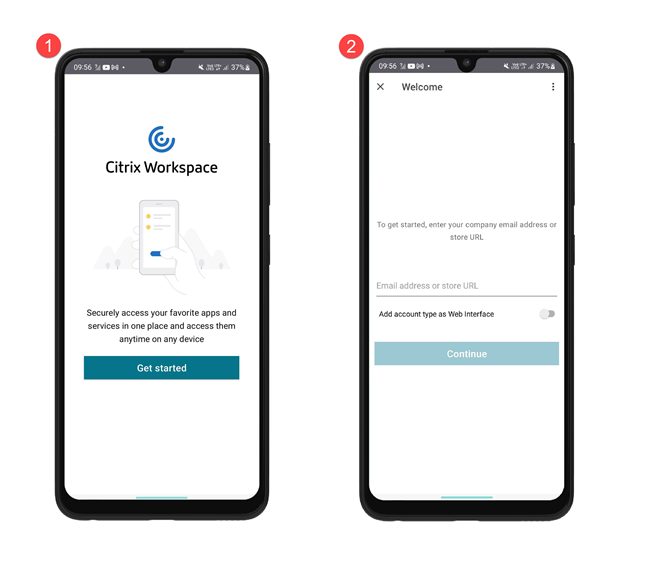
- Open the Citrix Workspace app and then click Get Started.
-
In the Welcome screen, enter your store URL or email address and click Continue.
- Enter you credentials, if prompted.
Add multiple accounts
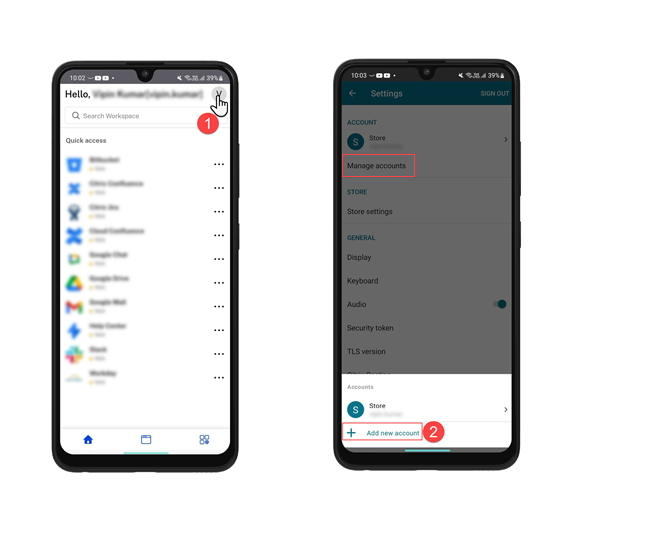
- Tap the profile icon on the upper right of the home screen.
- Tap Manage Account and then tap Add new account.
For more information on managing account, refer:
The official version of this product documentation is in English. Any non-English version is solely provided for your convenience and may include machine-translated content. For more information, please refer to the Machine Translation Disclaimer on Cloud Software Group home.
DIESER DIENST KANN ÜBERSETZUNGEN ENTHALTEN, DIE VON GOOGLE BEREITGESTELLT WERDEN. GOOGLE LEHNT JEDE AUSDRÜCKLICHE ODER STILLSCHWEIGENDE GEWÄHRLEISTUNG IN BEZUG AUF DIE ÜBERSETZUNGEN AB, EINSCHLIESSLICH JEGLICHER GEWÄHRLEISTUNG DER GENAUIGKEIT, ZUVERLÄSSIGKEIT UND JEGLICHER STILLSCHWEIGENDEN GEWÄHRLEISTUNG DER MARKTGÄNGIGKEIT, DER EIGNUNG FÜR EINEN BESTIMMTEN ZWECK UND DER NICHTVERLETZUNG VON RECHTEN DRITTER.
CE SERVICE PEUT CONTENIR DES TRADUCTIONS FOURNIES PAR GOOGLE. GOOGLE EXCLUT TOUTE GARANTIE RELATIVE AUX TRADUCTIONS, EXPRESSE OU IMPLICITE, Y COMPRIS TOUTE GARANTIE D'EXACTITUDE, DE FIABILITÉ ET TOUTE GARANTIE IMPLICITE DE QUALITÉ MARCHANDE, D'ADÉQUATION À UN USAGE PARTICULIER ET D'ABSENCE DE CONTREFAÇON.
ESTE SERVICIO PUEDE CONTENER TRADUCCIONES CON TECNOLOGÍA DE GOOGLE. GOOGLE RENUNCIA A TODAS LAS GARANTÍAS RELACIONADAS CON LAS TRADUCCIONES, TANTO IMPLÍCITAS COMO EXPLÍCITAS, INCLUIDAS LAS GARANTÍAS DE EXACTITUD, FIABILIDAD Y OTRAS GARANTÍAS IMPLÍCITAS DE COMERCIABILIDAD, IDONEIDAD PARA UN FIN EN PARTICULAR Y AUSENCIA DE INFRACCIÓN DE DERECHOS.
本服务可能包含由 Google 提供技术支持的翻译。Google 对这些翻译内容不做任何明示或暗示的保证,包括对准确性、可靠性的任何保证以及对适销性、特定用途的适用性和非侵权性的任何暗示保证。
このサービスには、Google が提供する翻訳が含まれている可能性があります。Google は翻訳について、明示的か黙示的かを問わず、精度と信頼性に関するあらゆる保証、および商品性、特定目的への適合性、第三者の権利を侵害しないことに関するあらゆる黙示的保証を含め、一切保証しません。
ESTE SERVIÇO PODE CONTER TRADUÇÕES FORNECIDAS PELO GOOGLE. O GOOGLE SE EXIME DE TODAS AS GARANTIAS RELACIONADAS COM AS TRADUÇÕES, EXPRESSAS OU IMPLÍCITAS, INCLUINDO QUALQUER GARANTIA DE PRECISÃO, CONFIABILIDADE E QUALQUER GARANTIA IMPLÍCITA DE COMERCIALIZAÇÃO, ADEQUAÇÃO A UM PROPÓSITO ESPECÍFICO E NÃO INFRAÇÃO.